Discover your rates and connect electricity to your home.
Ring us
Mon to Fri 8AM – 5:30pm
0800 00 9473 (WISE)
>> Can't find your address?
GO>>
Switch Now
Discover your rates and connect electricity to your home.
Ring us
Mon to Fri 8AM – 5:30pm
0800 00 9473 (WISE)
GO>>
>> Can't find your address?
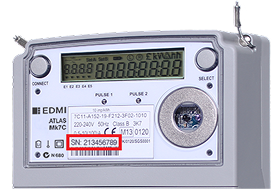
Where to Find the Meter Serial Number
On the Meter Label: The serial number is usually printed on a label affixed to the front or side of the meter. It is often marked as "S/N" or "Serial Number" and consists of a combination of letters and numbers.
Below the Barcode: Many meters have a barcode, and the serial number is typically displayed directly below it.
On the Digital Display: Some smart meters allow you to view the serial number by pressing a button to scroll through available information.
On Your Electricity Bill: The meter serial number may be listed on your electricity bill, making it easy to cross-check with the physical meter.
What's an ICP number?
Your ICP number is your Installation Control Point number.
It’s a unique 15 digit number that identifies your connection to our electricity network.
You can find it on your electricity bill, usually near the account details section.